
Rehearse. Get feedback. Go again.
Practice hard conversations out loud, starting in ChatGPT
Describe the difficult conversation you’re dreading — with your manager, your partner or your family. ChatGPT sets up a voice roleplay with a character who pushes back. You talk it through, then get feedback right in the chat.
 Private to you
- Never used to train AI
- No access to your chat history

How it works
From “I’m dreading this” to a rehearsed conversation in a few minutes, set up from the chat where you’re already planning it.
Add NoPressure to ChatGPT
Open the NoPressure plugin in ChatGPT and install it. You sign in to NoPressure once, and your roleplays stay private to you.
Describe the conversation
Tell ChatGPT what's coming up: who it's with, what's happened so far, what makes it hard and what you want to walk away with. ChatGPT turns that into a roleplay with a character who has their own point of view.
Rehearse it out loud
Press Start on the card in the chat. NoPressure opens in a new tab, and you talk it through by voice with a character who pushes back.
Debrief in the chat
When you hang up, go back to ChatGPT and press Continue in chat on the card. Your feedback and the transcript go back into ChatGPT, so you can work out what to say differently and run it again.
Try it with a conversation like yours
Already installed the plugin? Pick the one closest to yours, or describe your own. The more specific you are about the other person, the more the character behaves like them.
Nailing a job interview
“Set up a mock interview for a senior product manager role at a fintech startup. The hiring manager is skeptical of career switchers and will push on why I left my last job.”
Try in ChatGPT
Setting a boundary with family
“Help me practice telling my mom we're not coming home for the holidays this year. She takes it personally and brings up every time we've let her down.”
Try in ChatGPTAsking for a raise
“Set up a roleplay so I can practice asking my manager for a 15% raise. She's supportive but always says the budget is tight.”
Try in ChatGPTTalking money with a partner
“Let me rehearse bringing up our spending with my partner. Every time I bring up money he goes quiet and changes the subject.”
Try in ChatGPTGiving a tough performance review
“Help me rehearse giving my direct report a "below expectations" rating on Thursday. He thinks he's doing great and gets defensive fast.”
Try in ChatGPTAsking a friend to pay rent on time
“Set up a roleplay so I can practice asking my roommate, who is also a close friend, to start paying rent on time. I hate conflict and usually let it slide.”
Try in ChatGPT
Why rehearse out loud, not just plan it
ChatGPT is good at helping you plan what to say. NoPressure is where you practice saying it, to someone who answers back.
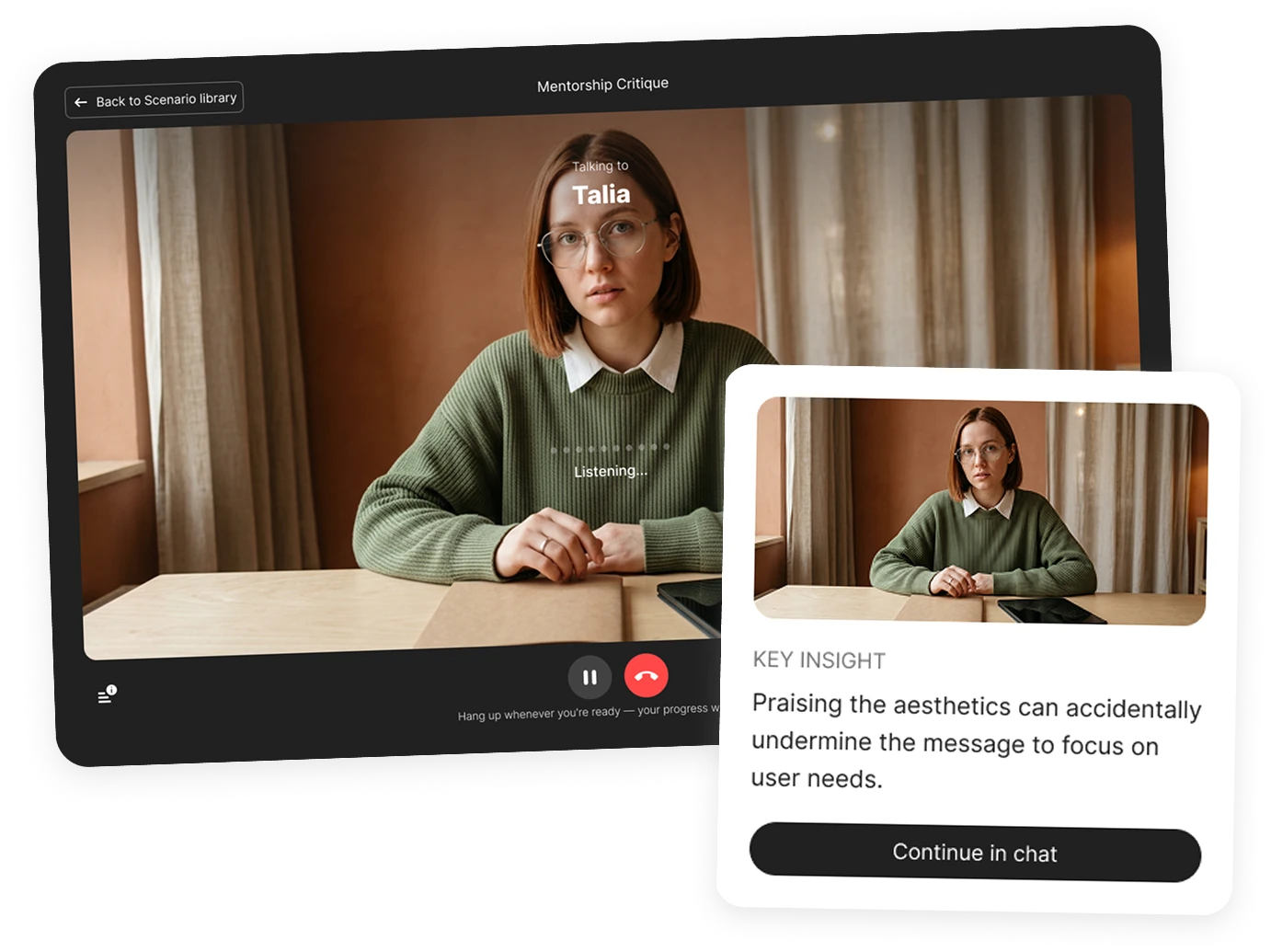
A character who pushes back
The other person has a name, a role, a stance and a voice. They react to what you actually say, not to a script.
Feedback built from your words
The debrief quotes the phrases you used and suggests alternative wording, instead of handing out generic communication tips.
Your debrief comes back to the chat
Feedback and transcript land in the same ChatGPT conversation, so you can work through them with everything you already told it.
Run it again, compare attempts
Run the same roleplay as often as you like. Each attempt gets its own debrief, so you can see whether the second went better than the first.
Difficult conversations you can rehearse
At work
- Answering tough job interview questions
- Negotiating a job offer
- Giving a performance review
- Asking for a raise
- Delivering critical feedback
- Saying no to a deadline
- Pushing back on a stakeholder
- Delivering bad news
- Running a first 1:1 with a new team
- Resolving conflict with a peer
- Escalating to your manager
- Telling a client a project is late
- Negotiating scope
- Handing in your resignation
In your personal life
- Setting a boundary with a parent
- Talking about money with a partner
- Confronting a friend
- Apologizing after a fight
- Breaking up with someone
- Saying no to a favor
- Raising a problem with a roommate
- Negotiating with a landlord
- Telling family about a big decision
- Having a hard talk with your teenager
If there's one other person with their own point of view, you can rehearse it.
Frequently asked questions
What is the NoPressure plugin for ChatGPT?


It lets you rehearse a difficult conversation out loud before it happens. You describe the situation in ChatGPT, it creates a voice roleplay with a character who has their own point of view, you talk it through in NoPressure, and the feedback and transcript come back into the chat.
How is this different from roleplaying in ChatGPT voice mode?
Voice mode is a conversation with ChatGPT itself. NoPressure generates a separate character from your brief, with a name, a role, a stance and a voice of their own, who holds their position and pushes back. Afterwards you get a debrief that quotes what you said and suggests other wording, and you can run the same roleplay again to compare attempts.
Can I use it to practice a job interview?
Yes. Describe the role, the company and the interviewer: what they tend to probe and what they might be skeptical about. The character runs the interview as that person, and the debrief quotes your answers and suggests stronger wording. It works for one-on-one interviews, since each roleplay has one other person.
Is it only for work conversations?
No. Use it for any conversation that's hard to have: a job interview, a performance review or a salary negotiation, but also setting a boundary with family, talking about money with a partner, or confronting a friend. If there's another person with their own point of view, you can rehearse it.
How do I add NoPressure to ChatGPT?
Click "Add to ChatGPT" on this page to open the NoPressure plugin in ChatGPT, press Install plugin, and sign in to NoPressure. After that, ChatGPT can create roleplays for you whenever you describe a conversation you want to practice.
What do I need to use it?
A ChatGPT account, a NoPressure account that you sign in to when you install the plugin, and a browser with a microphone for the voice roleplay.
How do I start a roleplay?
Describe the conversation you have coming up — who it's with, their role, how they tend to react, what's at stake and what outcome you want — and ask to practice it, or ask for NoPressure by name. The more concrete detail you give, the more the character will feel like the real person.
Where does the voice conversation happen?
ChatGPT shows a card for your roleplay with a Start button. Start opens NoPressure in a new browser tab, where you speak with the character using your microphone. When you finish, go back to ChatGPT and press Continue in chat on the card to send your feedback and transcript back to ChatGPT for the debrief.
Can NoPressure read my ChatGPT conversations?
No. NoPressure only receives the brief ChatGPT writes when it creates your roleplay. It has no access to your chat history, calendar, email or documents.
Who can see my roleplays and feedback?
Only you. Roleplays created from ChatGPT live in your own private NoPressure workspace. They aren't shared with anyone or published anywhere.
Do you use my practice sessions to train AI models?
No. We do not use your data for training, and neither do any third-party services we work with.
Where is my data stored, and can I delete it?
Your data is encrypted and stored in Europe on Google Cloud Platform, under Data Processing Agreements with our service providers. You can request deletion of your data at any time by emailing [email protected].
Does NoPressure track my emotions or tone?
No. We do not track, detect or infer your emotions. We only analyze your communication during the practice session: what you said, how you structured it, and whether you reached the goal of the roleplay.
Can I practice the same conversation more than once?
Yes. Ask ChatGPT to show the roleplay again and press Start. Every run produces its own debrief, which makes it easy to compare attempts and see what changed.
Is there a version of NoPressure for training teams?
Yes. The ChatGPT plugin is for practicing your own conversations. For learning and development teams, NoPressure offers custom scenarios built around your participants, shared workspaces and measurement of behavior change across attempts.
Your next hard conversation, rehearsed first
Add NoPressure to ChatGPT once, then practice whenever something difficult is coming up. Your roleplays stay private to you and are never used to train AI.
Running a training program? See NoPressure for teams